Ventra
- 3.1
- Rating
- 1.00M
- Installs
- Free
- Price

 Analysis by App-foxy
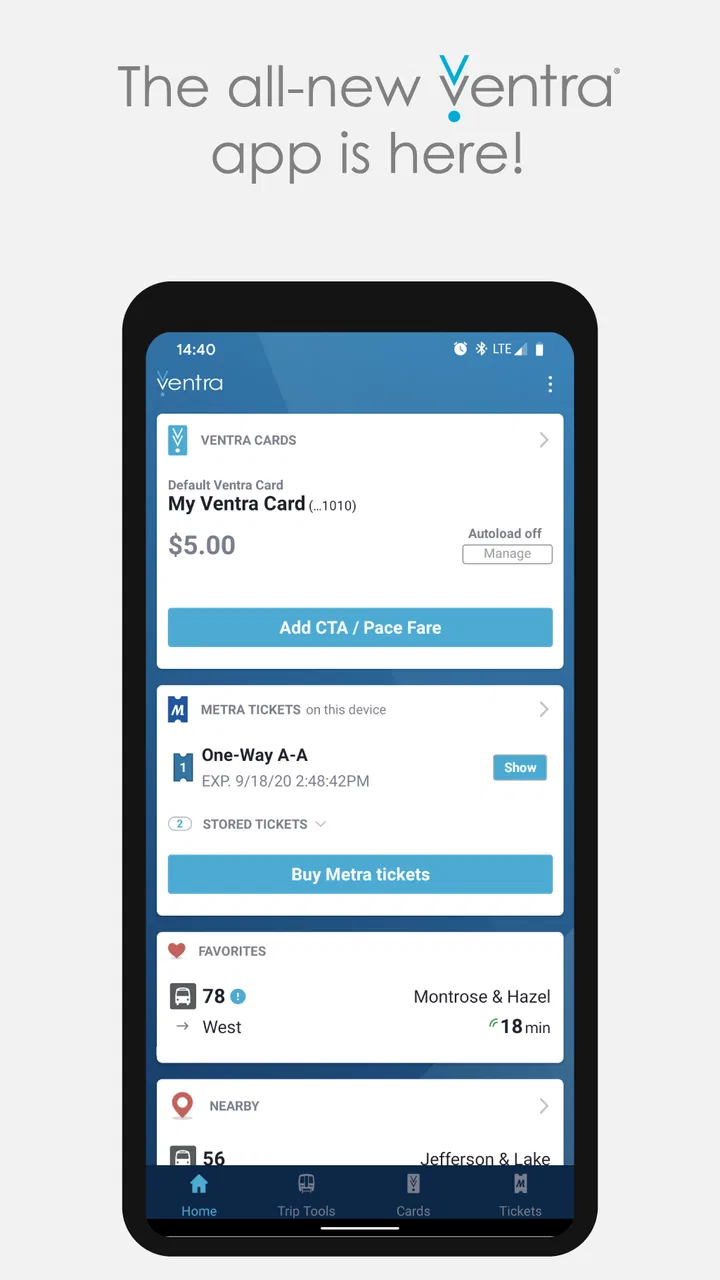
Ventra is the kind of public transit app that makes the most sense once it becomes part of your normal Chicago travel routine. Developed by the Chicago Transit Authority, it brings fare management, Metra ticket purchases, and arrival information into one place. I found it more useful as a practical travel companion than as a complete trip-planning replacement: it helps me handle the payment side of a journey and check transit timing, while I still prefer a broader maps app when I need to compare several routes or include walking and driving options.
The app is free, rated for Everyone, and supports devices running Android 7.0 or later. Its current version is 2.2.13, and it has passed the million-install mark, so it is clearly used by more than just occasional visitors. Its average score is 3.1 from roughly 6,500 ratings, with about 3,700 written reviews. That mixed reception matches my impression: Ventra can simplify an everyday commute, but it rewards users who understand what it is designed to do and where its boundaries are.
How I use Ventra for a normal Chicago transit day
I use Ventra as the practical checkpoint in a Chicago transit day, not as the place where I solve every route question. Before I leave, I decide which task needs attention first: checking an arrival, making sure my fare is ready, or arranging a Metra ticket. That small pause helps me catch setup problems while I still have time to sort them out.
You May Also Like

 Blood Strike: 2.5 Anniversary
Blood Strike’s Loadouts Turn Every Drop Into a Tactical Gamble
A close look at Blood Strike’s custom loadouts: how fast access to signature weapons reshapes its battle royale rhythm, rewards preparation, and narrows the gap between fights.

 Pandora - Music & Podcasts
Pandora’s Music Is Easy to Start, but Harder to Recover
Pandora’s strength is its low-effort path from a seed to a station. Its weak spot is how much confidence it asks you to place in connection, setup, and quiet recovery.

 8 Ball Pool
 Is Built on Rivalries, Rematches, and Routine
A close look at the rivalries, rematches, shared routines, and unanswered safety questions that turn a quick pool match into a persistent mobile community.

 Samsung Music
’s Quiet Strength Is Playing What You Already Own
Its reach comes less from spectacle than from dependable access to a personal library. That simplicity is both the app’s strongest retention engine and its ceiling.

 AccuWeather: Weather Radar
AccuWeather Review: A Quick, Clear Forecast for Everyday Decisions
For everyday plans, the best forecast is the one you can understand quickly. AccuWeather makes rain timing, radar, and local conditions easy to act on, with a few trade-offs.

 Hill Climb Racing
Why Hill Climb Racing Still Turns Crashes Into One More Run
A tiny car, a bumpy hill and one more upgrade: Hill Climb Racing keeps resurfacing because its simple chaos makes every near-miss feel personal.
More From Our News Desk



Starting with the fare task instead of the route task
My most reliable workflow begins before I leave home. I open Ventra to deal with the part of the trip that can cause the most avoidable stress: making sure I have the right fare arrangement or ticket ready. The app is not merely a timetable screen. Its central value is the ability to manage fares for CTA travel and purchase Metra tickets, which means I can prepare the payment side of a trip without switching immediately between several transit-specific tools.
That distinction matters. If I am commuting on a familiar CTA route, I do not need a long explanation of every possible journey. I need confidence that my fare is available and a quick way to check when the next vehicle is expected. Ventra fits that narrow, repeatable task well. For an unfamiliar trip, I usually begin with a map application to understand the full route, then use Ventra for the transit-specific actions that a general map often handles less directly.
For Metra, I treat the app differently. A train ticket is something I want to arrange before boarding rather than figure out while moving through a station. I check the journey details, purchase the applicable ticket in the app, and keep the phone accessible for the inspection stage. This workflow is especially useful when I am traveling at an unusual time or taking a train from a station I do not use regularly. The benefit is not flashy; it is the reduction of small decisions when I am already trying to catch a departure.
A realistic weekday example
Imagine a weekday trip that starts with a CTA ride and continues toward a Metra station. I would first check the arrival information for the initial CTA leg, then confirm that my fare setup is ready. If the next vehicle is close, I can leave immediately; if the wait is longer, I have a better chance of deciding whether to walk farther, adjust my timing, or use a different connection. Once the Metra portion becomes relevant, I handle that ticket separately rather than assuming the first step covers the entire journey.
This is where Ventra feels more useful than a generic transit display. It recognizes that Chicago travel can involve different services and different fare actions. At the same time, it does not remove the need for judgment. An arrival estimate is not a guarantee that the vehicle will be convenient for my complete trip, and buying a ticket does not tell me whether a connection leaves enough time for a transfer. I still check the wider route and allow a sensible margin.
What I check before relying on the screen
I pay attention to the service I am viewing and the direction of travel rather than tapping through arrival information mechanically. A nearby time can look reassuring while belonging to the wrong platform, route, or direction. My habit is to confirm the stop or station context first, then read the arrival information. This takes only a moment and prevents one of the most common mistakes with any transit app.
I also avoid opening Ventra for the first time when I am already standing at a gate or boarding point. Preparing the fare action earlier gives me time to deal with sign-in, payment, or connectivity friction without blocking myself from moving. The best use of Ventra is preparation, not last-second improvisation. That is a small habit, but it makes the app feel much more dependable.
Settings and account details worth checking
After installing the app, I would review the account and payment areas before planning an important trip. The exact screens can change with updates, but the principle is stable: verify that the account information and payment method you intend to use are actually ready. A transit app is not the place to discover a stale card or an unfinished setup while a train is waiting.
I also check notification-related choices if they are available on my device and in the current app experience. I do not want every transit update to become noise, but I do want the app to be easy to open when I am traveling. On a daily commute, excessive alerts can make the phone feel cluttered; on an occasional Metra journey, a reminder or timely status message can be more valuable. My preference is to keep only the notifications that support a specific travel habit.
Another useful setting-level habit is keeping the phone’s operating system and the app itself reasonably current. Ventra supports Android 7.0 and later, and the current release is 2.2.13. I do not update immediately before an important trip if I can avoid it, because changing an app at the last minute introduces unnecessary uncertainty. Instead, I update during a calm period, open the app afterward, and confirm that I can still reach the fare and arrival screens I use.
Organizing a repeatable routine
Ventra becomes easier when I give it a defined job. For a regular CTA commute, that job might be checking arrivals and maintaining fare readiness. For a Metra trip, it might be buying the ticket ahead of time and keeping the purchase accessible. I do not expect the app to remember every travel decision for me; I use it as the transit-specific checkpoint in a larger routine.
This approach also helps with battery and attention. I do not leave the app open continuously while walking around Chicago. I check it when I need an arrival or fare action, then return to the map or other travel information. The app works best in short, purposeful sessions rather than as a screen I stare at throughout the day.
Faster patterns for experienced users
Once the basic workflow is familiar, I can make it faster by separating “planning” from “boarding.” Planning means deciding which service I need, checking the broader route, and preparing the fare. Boarding means opening the relevant screen quickly and avoiding unnecessary exploration. This separation is more efficient than trying to use Ventra as a complete travel encyclopedia.
For a familiar CTA route, I tend to check arrivals at the moment I am ready to leave rather than repeatedly refreshing from home. That gives the information a practical context: I know where I am, which direction I need, and how much walking I can tolerate. For a Metra journey, I reverse the priority. I handle the ticket earlier, because the purchase is a prerequisite rather than a last-minute estimate.
A second useful pattern is using a general maps app and Ventra side by side in purpose, not necessarily literally at the same time. The maps app is better for comparing walking distances, transfers, and alternative modes. Ventra is better for the CTA, Metra, and Pace fare tasks it directly supports. Trying to make one replace the other usually creates more work. Use Ventra for transit transactions and service-specific checks; use broader mapping tools for the whole door-to-door decision.
I also keep a backup mindset. If I am heading to an appointment, airport connection, or event with a fixed start time, I do not treat one arrival display as my only plan. I check the route early, allow time for a missed vehicle, and make sure my phone has enough charge for the journey. That is not a criticism unique to Ventra; it is the sensible way to use live transit information.
Where Ventra is stronger than the usual alternatives
Compared with a general maps app, Ventra feels more focused on the practical relationship between Chicago transit and fares. A map can tell me how to get somewhere, but it may not be the place I want to manage a Metra ticket or handle transit payment details. Ventra reduces that separation, especially for people who use CTA, Metra, and Pace rather than only one rail line.
Compared with checking a browser page, the app is more convenient for a repeated routine. I can open the same transit-focused tool each morning instead of navigating through a website and then switching elsewhere for fare actions. That convenience is modest, but repeated modest improvements are exactly what make a commuting app worthwhile.
Compared with relying on a physical fare method alone, the app offers a more flexible way to manage transit-related tasks from a phone. However, I would not describe it as a universal replacement for every payment or travel method. Its usefulness depends on whether my journey fits the services and fare actions it covers, and I still need to follow the applicable transit process when boarding or riding.
Where other tools are better
I would not choose Ventra as my only navigation app for a first-time visitor who wants a complete walking itinerary, restaurant stop, driving alternative, or multi-city comparison. Its focus is Chicago transit, not broad travel discovery. A general maps service gives me a wider picture of the journey and is usually easier for combining transit with walking directions.
I would also be cautious about depending on it as the sole source of certainty during a disruption or a tightly timed connection. Arrival information helps me make decisions, but it does not eliminate the need to read station signs, listen for announcements, or allow extra time. When the cost of being late is high, I use Ventra as one input rather than as an absolute promise.
Limits that affect the advanced workflow
The app’s focused design can feel restrictive when my needs go beyond fares and arrival checks. I may still need another tool to understand a complicated chain of transfers, compare every available mode, or plan the walking portions precisely. That is not a reason to dismiss Ventra, but it does mean I should install it with a clear expectation: it is a Chicago transit utility, not an all-purpose travel planner.
There can also be friction whenever a transaction depends on a phone, an account, or a working connection at exactly the wrong moment. I reduce that risk by preparing tickets before I reach the station and by avoiding unnecessary account changes on travel day. I also keep the phone charged and do not assume that opening the app at the platform will always be effortless.
Its average rating of 3.1 suggests that the experience has not been uniformly smooth for everyone. I would read that as a reason to test the complete workflow before an important trip: open the app, review the fare path, check an arrival, and make sure the result is understandable to me. A few minutes of testing can reveal whether the interface suits my habits before I depend on it during a crowded commute.
Who should install it, and who can skip it
Ventra is a strong fit for Chicago residents who regularly use CTA, Metra, or Pace and want one transit-oriented place for fare management, Metra ticket purchases, and arrival checks. It is also useful for visitors who already know which services they will use and prefer to prepare the payment side of their trip on a phone. The free price makes it easy to try without making a financial commitment.
I would recommend it particularly to people whose travel crosses service boundaries. Someone who alternates between CTA rides and Metra journeys gains more from its combined focus than someone who only wants a walking route. The app can also suit commuters who value a repeatable morning routine more than a long list of extra planning features.
I would skip it if I rarely use Chicago public transportation, have no need for its fare functions, or want a single app to plan every part of a trip across many travel modes. In that situation, a general maps app may be enough. I would also avoid making it my only tool if I am uncomfortable preparing a fare or ticket in advance and expect every transit question to be answered from one screen.
My verdict after making it part of a routine
I see Ventra as a useful specialist rather than a complete transportation command center. Its strongest moments are concrete: checking a CTA arrival before leaving, preparing a Metra ticket ahead of boarding, and keeping transit fare tasks in a Chicago-focused app instead of scattering them across unrelated tools. Those jobs are valuable because they happen repeatedly, not because the app tries to do everything.
The trade-off is that I need to bring my own travel judgment. I still use broader mapping for door-to-door planning, allow time for imperfect arrivals, and prepare important fare actions before reaching the station. Once I accept that division of labor, the app becomes much less frustrating and much more practical.
With more than a million installs, Ventra has clearly found a substantial audience, but its middling average rating is a reminder to approach it realistically. I would install it for Chicago transit if I needed CTA, Metra, or Pace fare support and arrival information, then test my usual journey before relying on it. For a regular Chicago rider, Ventra is worth keeping because it turns recurring transit chores into a repeatable habit; for everyone else, its specialized focus may not justify another app.
FAQs for Ventra
01What is Ventra and what does it do?
Ventra is a transit app designed to simplify public transportation in Chicago. It allows users to manage fare cards, purchase tickets, and track buses and trains in real-time. The app aims to enhance the commuting experience by providing a seamless, digital solution for managing travel needs.
02Is Ventra available for both Android and iOS devices?
Yes, Ventra is available for download on both Android and iOS platforms. Users can easily find the app on the Google Play Store for Android devices and the App Store for iOS devices, ensuring accessibility across various smartphones and tablets.
03How secure is the payment process in the Ventra app?
Ventra prioritizes user security by integrating secure payment gateways and encryption protocols. Users can safely add funds, purchase tickets, and manage their accounts, with confidence that their personal and financial information is protected against unauthorized access.
04Can I use Ventra without an internet connection?
While some features, such as real-time tracking and ticket purchases, require an internet connection, Ventra does offer offline functionalities. Users can access stored tickets and view previously downloaded maps without needing to be online, providing flexibility during commutes.
05Are there any additional fees for using the Ventra app?
The Ventra app itself is free to download and use. However, standard fare rates apply when purchasing tickets or adding funds to a transit card. Users should also be aware of potential data charges from their mobile carrier when using the app's online features.
Pros
- User-friendly interface for seamless navigation.
- Real-time tracking of bus and train schedules.
- Integrated payment options for convenience.
- Customizable alerts for service updates.
- Supports multiple transit systems in one app.
Cons
- Occasional glitches with route updates.
- Limited offline functionality for maps.
- Sometimes slow to load during peak hours.
- Requires strong internet for optimal use.
- Interface can be cluttered with features.

Ventra
Gallery